
How to Automate Business Workflows Effectively in 2026
 Vladimiros MykogianSeptember 30, 2026
Automating business workflows means using software and AI to execute recurring tasks with minimal human input, so your team focuses on high‑value work instead of manual busywork. Done well, it cuts cycle times, reduces errors, and creates real-time visibility across your operations. Done badly, it just moves chaos into code.
This guide shows you how to automate business workflows effectively, step by step. You will learn what to automate first, how to design solid processes, which tools and architectures fit different stages of growth, and how to avoid the traps that make automation fragile or impossible to maintain.
What does it really mean to automate business workflows?
To automate business workflows effectively, you standardize how work flows through your company, then let software systems trigger, process, and track that work without constant human intervention. The key is not “replacing people with bots”, but making every repetitive, rules-based step predictable and machine-readable.
In practice, a good workflow automation does three things at once: it orchestrates events across multiple tools, it records every step for audit and optimization, and it exposes clear inputs and outputs so humans know where they add the most value. A small sales team might connect web forms, CRM, and email to pre-qualify leads. A larger organization might run ETL pipelines that move raw data into a warehouse, then trigger reporting and alerts.
Core components of an automated workflow
A robust workflow automation usually contains:
- Trigger (event or schedule) that starts the flow.
- Inputs (data fields, files, messages) that the system consumes.
- Business rules that decide what happens next.
- Actions (create record, send message, update status, call an API).
- Human checkpoints for approvals or exceptions.
- Logs and metrics so you can monitor and improve.
Once you see workflows as these building blocks, you can redesign them independent of any specific tool.
Which workflows should you automate first for maximum impact?
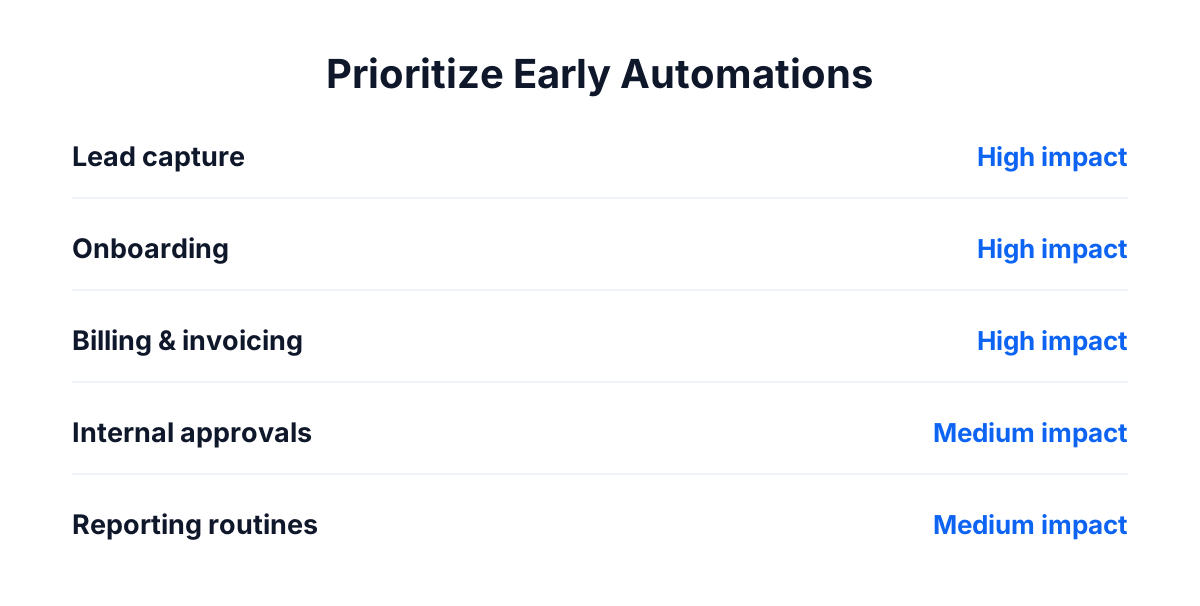
You should start by automating workflows that are repetitive, rules-based, and tightly tied to revenue or risk. That is where you get quick wins and visible ROI without introducing dangerous complexity. The wrong starting point is the most complex edge case in your organization, even if it feels the most painful anecdotally.
A practical way to prioritize is to build a simple 2 by 2: business impact on one axis, implementation effort on the other. Focus first on high-impact, low-to-medium effort flows. Typical early candidates include lead intake, quote approvals, onboarding, invoicing, and simple data sync between core tools.
High-value candidates to consider
- Lead capture and qualification (web forms to CRM to email sequences).
- Customer onboarding (welcome emails, account creation, task checklists).
- Recurring billing and invoicing (invoice generation, reminders, dunning).
- Order processing for e-commerce (payment confirmation, stock updates, shipping notifications).
- Internal approvals (time off requests, purchase approvals, expense claims).
- Reporting routines (daily KPIs, weekly sales updates, monthly financial snapshots).
The judgment call: resist the temptation to “automate everything” on day one. Prove value on 3 to 5 well-chosen workflows, build organizational trust, then expand.
How to map and redesign a workflow before you touch tools
The most common mistake in workflow automation is wiring tools together without understanding the underlying process. If the process is vague or inconsistent, your automation will reflect that confusion in code, then become hard to change. Before you write a single integration, you need a clean, explicit map of the workflow.
Here is a simple decision sequence to follow:
- Define the business outcome. What exactly should this workflow achieve and how do you measure success (time to complete, error rate, revenue, satisfaction)?
- List the actors and systems. Who is involved, and which tools or databases hold the relevant data today?
- Write the current steps. Capture the actual behavior, not the ideal one. Include every copy-paste, download, email, and manual spreadsheet.
- Identify variants and exceptions. Where does the flow branch? Which cases need human review, and why?
- Remove unnecessary steps. Challenge each step: can we delete, simplify, or merge it before we automate it?
- Design the target flow. Draw the new, streamlined process with clear triggers, rules, and handoffs.
- Mark automation boundaries. Decide which steps will be automated, which stay manual, and which are hybrid (automation plus human approval).
Techniques that keep process mapping practical
You do not need complex BPM tools to start. A whiteboard, digital whiteboard, or even a clean document is enough if you:
- Use clear boxes and arrows, one box per meaningful step.
- Annotate each step with “system, role, expected duration”.
- Highlight decision points with simple yes or no questions.
- Distinguish “happy path” from exception paths.
Teams that are new to automation often benefit from a short education cycle first. That is why studios like LetrionAI pair workflow mapping with concepts from their free programs in AI, software development, and business intelligence, so non-technical stakeholders can reason about data flows, triggers, and APIs in concrete terms.
What tools and architectures should you use at each stage of growth?
The best automation approach depends heavily on your size, technical depth, and regulatory constraints. Early-stage companies can move fast with no-code automation. Larger or more regulated organizations usually need custom integrations, event-driven architectures, and stricter controls. The wrong move is adopting “enterprise” complexity too early or staying on brittle scripts when your scale demands more.
At a high level, you can think in three tiers: tactical no-code, scripted and API-driven, and fully engineered workflow platforms. As you grow, you usually move from left to right, not by ripping everything out, but by replacing the most critical flows with more maintainable implementations.
Comparing workflow automation options
| Approach | Best for | Pros | Cons |
|---|---|---|---|
| No-code automation tools | Small teams, quick experiments | Fast to set up, visual builders, low upfront cost | Harder to maintain at scale, limited control |
| Custom scripts and API glue code | Technical teams, specific integrations | Highly flexible, can match your exact logic | Requires engineering time and version control |
| Full workflow or iPaaS platforms | Mid to large organizations, many systems | Centralized monitoring, governance, scalability | Higher cost, steeper learning curve |
For many businesses, a hybrid approach works best. Start with visual tools for non-critical workflows, then migrate your highest-value or highest-risk flows to engineered services running on infrastructure like AWS, GCP, or Azure when volumes and complexity increase.
How to automate business workflows with AI and LLMs
AI and large language models add a new layer to workflow automation: they can interpret unstructured inputs, propose decisions, and even draft communication. The key is to use AI where rules break down or where human-like interpretation adds strong value, not as a replacement for well-defined logic.
Effective AI-powered workflows usually blend deterministic rules with probabilistic AI steps. For example, you might keep strict rules for payment processing, but use an LLM to categorize support tickets or summarize long documents. This combination keeps the core of your system predictable while still gaining efficiency where human reading or writing used to be required.
Where AI automation makes the most sense
- Document processing: Extracting entities from contracts, invoices, or PDFs, then passing them into structured systems.
- Customer support triage: Classifying tickets, suggesting responses that agents can approve, routing to the right team.
- Sales assistance: Generating tailored outreach based on CRM data and prior interactions.
- Data enrichment: Filling in missing fields, standardizing free-text entries, detecting duplicates.
- Analytics and insight summaries: Turning raw BI dashboards into natural language updates for stakeholders.
If you are evaluating AI-driven workflows, it can help to read a deeper definition of AI automation and how businesses use it, then layer those capabilities on top of the core process design described in this article.
How do you design automation that is secure, scalable, and maintainable?
The quickest way to sabotage automation efforts is to ignore security, scalability, and maintainability until late in the project. Business workflows almost always touch sensitive data, expose integrations across tools, and impact your ability to transact. You cannot treat them as side scripts.
From the start, treat each meaningful automation as a small product with its own lifecycle. That means version control for changes, environment separation for testing, monitoring and alerting in production, and clear ownership. Even if you are “only connecting tools”, your automation graph becomes part of your critical infrastructure.
Non-negotiable engineering practices
- Access control and least privilege: Limit who and what can trigger or modify workflows.
- Audit trails: Log every important action with timestamps and identifiers.
- Error handling and retries: Plan for timeouts, partial failures, and upstream changes.
- Scalable architecture: Use queues or event streams instead of direct point-to-point calls for high-volume flows.
- Testing and staging environments: Validate new rules and integrations before they touch real customers.
Studios that operate across frontend, backend, data, and automation, like LetrionAI, usually build these principles in from the first diagram. After 150 plus shipped projects with 24 by 7 support, you learn that reliability is not an add-on, it is the actual product.
How do you measure success and continuously improve your workflows?
You know automation is working when it shortens cycle times, reduces manual touches, and improves consistency without drowning your team in exceptions. Measuring that requires you to define clear metrics upfront and to revisit them regularly. If you do not quantify improvement, stakeholders will inevitably question whether the effort was worthwhile.
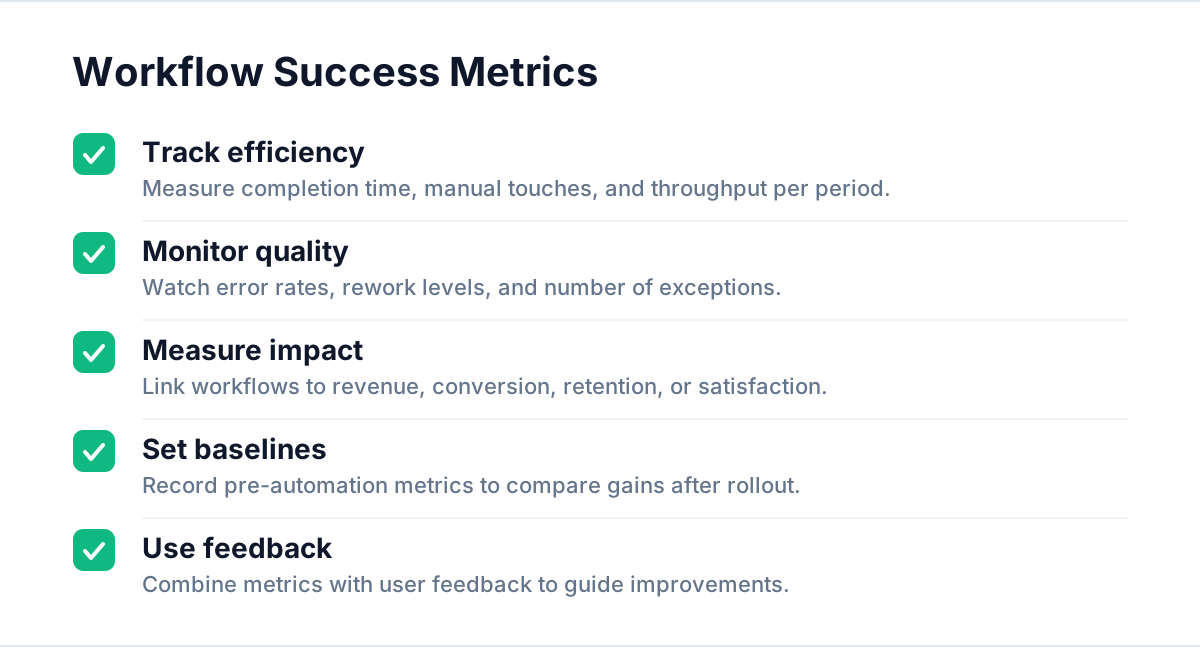
A simple framework is to track three categories of metrics per workflow: efficiency, quality, and business impact. For each, define a baseline before automation, then target improvements after roll-out. Over time, this gives you a portfolio view of how automation contributes to your bottom line and customer experience.
Metrics that matter
- Efficiency: average time to complete the workflow, number of manual touches, throughput per day or week.
- Quality: error rate, rework required, number of exceptions or escalations.
- Business impact: conversion rate, revenue per cycle, retention or churn, satisfaction scores.
Pair these with qualitative feedback from the people who use the workflows every day. Engineers and operators will spot where automations are brittle or annoying long before the dashboards show it. Used together, feedback and metrics tell you what to refine next.
Common mistakes when you automate business workflows (and how to avoid them)
Most automation failures come from human decisions, not technical limits. Teams underestimate hidden complexity, forget to clean their data, or automate broken processes. Recognizing these patterns early saves months of rework and prevents the “we tried automation and it did not work for us” narrative.
The most damaging mistake is to think of automation as a one-time project instead of an ongoing capability. Processes change, tools evolve, regulations update. If you do not assign ownership and budget for continuous refinement, your workflows will drift out of sync with reality.
Pitfalls to watch for
- Automating ambiguity: If people disagree on how a process works, you are not ready to automate it.
- Ignoring edge cases: Rare events still need defined behavior, even if that behavior is “notify a human”.
- Underestimating change management: Staff need training and clear communication about why workflows changed.
- Tool sprawl: Adding yet another platform for a marginal use case, which increases cognitive load and failure points.
- No integration strategy: Point-to-point connections without an architecture vision lead to tangled dependencies.
If you want a broader context on how automation fits into software delivery as a whole, pairing this article with guidance on CI or CD pipelines and their meaning can help you see how process automation and code automation reinforce each other.
Conclusion: turn automation into a core capability, not a side project
To automate business workflows effectively, you need more than a stack of tools. You need clear, mapped processes, smart prioritization, a fit-for-stage architecture, and disciplined engineering practices. Start where rules are clear and impact is high, mix deterministic logic with AI where interpretation is needed, and treat each workflow as a product that deserves ownership, monitoring, and continuous improvement.
If you want support designing or implementing automations across your web, mobile, backend, and data systems, you can start by mapping one or two critical workflows, then explore a short consultation to pressure test your ideas before you commit engineering time.